SQLUNINTERRUPTED

I am just a medium, SQL Server the Goal

Category Archives: SQL Engine

What’s new SQL Server 2012–Server Level Auditing For all Editions

During my customer visits and over other offline interactions I have had with customer, one thing which they have always complained about is the fact that Server Level auditing in not available for other editions of SQL Server, except for the Enterprise, Developer and Evaluation Edition.

Now there is good news. With SQL Server 2012, Server level Auditing is now available for all editions of SQL Server. Database level auditing still remains limited to Enterprise, Developer and Evaluation Editions.

In addition to extending the Server level auditing to all editions, there are have been certain enhancements to the Auditing options.

  1. The logging is more resilient to failures. For example, if the target log is on a network share, and if the network connection fails, SQL Server audit would restart when the network connectivity is restored.
  2. A new Fail_Operations option has been added to On_Failure clause. With this new operations the operations which invoke the Audit, would be failed if the Audit cannot be written to be log. As mentioned above, if the write failure condition is resolved, the operations would continue to work without problems.
  3. A new MAX_Files options has been added to the Audits. Earlier either the no of log written were unlimited (limited by the max size option or the space on the destination directory) or the number of logs were regulated by the Max_Rollover_Files option. Now, we can define a limit on the maximum number of files to be created.
  4. A new option Predicate Expression has been added to the Create Server Audit command. These predicate expressions are used to determine if the Audit needs to be invoked or not. The Predicate Expressions can be specified in a where clause in the Create Server Audit command.

SQL Server 2012 — ColumnStore Index

In the past, if you have been plagued with Slow performance of your data warehouse queries, there is some good news for you. With SQL Server 2012, we can now create ColumnStore Indexes, which would improve your query performance significantly. ColumnStore indexes are targeted for queries which use a Aggregations over columns or a set of columns.

Traditional SQL Server Approach

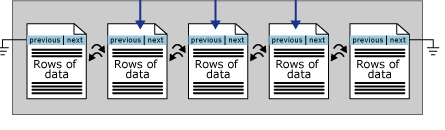
SQL Server has traditionally been using a row store based storage. Under this approach the complete data row is stored on a Data Page, and is read or written to as a complete unit. As shown below, the Row is Stored on the page

image

In the traditional approach, lets say if we had a table, with the given definition

create table t1
(
    a int,
    b int,
    c datetime,
    d varchar(300)
)

Assume we are running the following query against the table and that the table has about 1 billion records on approximately 40 million pages.

select SUM(a),AVG(b), MAX(c) from t1

In this case, we just need to do a sum of the values of column a. Given the row store approach, we would need to read the entire row (all the columns) to execute this query, which means we would need to read all the 40 million pages for this query and then perform the aggregation operation.

How ColumnStore Index Helps

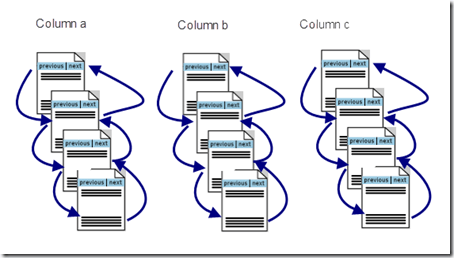
When we create a column store index on the table, it changes the way how data is organized. Data for each column which is included in the ColumnStore index is arranged separately. For example if we created a ColumnStore index on the above table on the columns (a, b and c). The columns would be organized independent of each other on different set of pages. as shown below.
image

Additionally, ColumnStore uses page compression by default. Most of the column values are similar if not same, and hence can greatly benefit from compression.

Now, with this arrangement, if we run the above mentioned query, we would only need to read pages for Column a, which in the above case would be only about ~300K(assuming 40% compression) of pages to read and sum the values of a, then another ~300K(assuming 40% compression) pages for the average of b and finally ~500(assuming 50% compression) pages to calculate the Max of c.

As mentioned, this type of organization helps queries where we are returning only some of the columns from a table. For queries where we need to return all the columns in a row, Row-Store approach works better. Typically, OLTP workloads benefit from row storage organization of data, while warehouse queries would benefit from ColumnStore index.

Restrictions on ColumnStore Indexes

The MSDN Article describes the restrictions or limitations to creating ColumnStore indexes. One thing to keep in mind, that when u create a ColumnStore index on a Table, you cannot Update the table. In Order to update the table, the quickest way would be to drop the column store index and then perform your insert, update, deletes. Once you are done with the DML’s, the ColumnStore Index can be recreated.

Example

I create two tables with the same schema but one with only a ColumnStore Index and another with a Clustered Index and a non clustered index. Both the table have about 7.7 million records.

This tables have been created on the AdventureWorks2012 sample database, which can be downloaded from here.

TableWithoutColumnStoreIndex

   1: use AdventureWorks2012

   2: go

   3:  

   4:  

   5: select * into dbo.TableWithoutColumnStoreIndex from Sales.SalesOrderDetail

   6: go

   7:  

   8: declare @count int =0

   9: while @count < 6

  10: begin

  11:     insert into dbo.TableWithoutColumnStoreIndex 

  12:     ([SalesOrderID],[CarrierTrackingNumber],[OrderQty],[ProductID],[SpecialOfferID],[UnitPrice],

  13:     [UnitPriceDiscount],[LineTotal],rowguid, [ModifiedDate])

  14:         select [SalesOrderID],[CarrierTrackingNumber],[OrderQty],[ProductID],[SpecialOfferID],[UnitPrice],

  15:     [UnitPriceDiscount],[LineTotal],NEWID(), [ModifiedDate] from dbo.TableWithoutColumnStoreIndex

  16:  

  17:     set @count=@count+1

  18: end

  19:  

  20:  

  21: /****** Object:  Index [IDX_Clustered]    Script Date: 2/1/2012 3:01:42 AM ******/

  22: CREATE CLUSTERED INDEX [IDX_Clustered] ON [dbo].[TableWithoutColumnStoreIndex]

  23: (

  24:     [SalesOrderDetailID] ASC

  25: )WITH (PAD_INDEX = OFF, STATISTICS_NORECOMPUTE = OFF, SORT_IN_TEMPDB = OFF, DROP_EXISTING = OFF, ONLINE = OFF, ALLOW_ROW_LOCKS = ON, ALLOW_PAGE_LOCKS = ON) ON [PRIMARY]

  26: GO

  27:  

  28: /****** Object:  Index [IDX_NonClustered]    Script Date: 2/1/2012 3:01:58 AM ******/

  29: CREATE NONCLUSTERED INDEX [IDX_NonClustered] ON [dbo].[TableWithoutColumnStoreIndex]

  30: (

  31:     [SalesOrderID] ASC,

  32:     [ProductID] ASC

  33: )

  34: INCLUDE (     [ModifiedDate]) WITH (PAD_INDEX = OFF, STATISTICS_NORECOMPUTE = OFF, SORT_IN_TEMPDB = OFF, DROP_EXISTING = OFF, ONLINE = OFF, ALLOW_ROW_LOCKS = ON, ALLOW_PAGE_LOCKS = ON) ON [PRIMARY]

  35: GO

  36:  

  37:  

TableWithColumnStoreIndex

   1: use AdventureWorks2012

   2: go

   3:  

   4: select * into dbo.TableWithColumnStoreIndex from Sales.SalesOrderDetail where 1=2

   5: go

   6:  

   7: Alter Table dbo.TableWithColumnStoreIndex Alter Column LineTotal numeric(18,6)

   8: go

   9:  

  10: insert into dbo.TableWithColumnStoreIndex 

  11: ([SalesOrderID],[CarrierTrackingNumber],[OrderQty],[ProductID],[SpecialOfferID],[UnitPrice],

  12: [UnitPriceDiscount],[LineTotal],rowguid, [ModifiedDate])

  13:     select [SalesOrderID],[CarrierTrackingNumber],[OrderQty],[ProductID],[SpecialOfferID],[UnitPrice],

  14: [UnitPriceDiscount],[LineTotal],rowguid, [ModifiedDate] from Sales.SalesOrderDetail

  15: go

  16:  

  17:  

  18: declare @count int =0

  19: while @count < 6

  20: begin

  21:     insert into dbo.TableWithColumnStoreIndex 

  22:     ([SalesOrderID],[CarrierTrackingNumber],[OrderQty],[ProductID],[SpecialOfferID],[UnitPrice],

  23:     [UnitPriceDiscount],[LineTotal],rowguid, [ModifiedDate])

  24:         select [SalesOrderID],[CarrierTrackingNumber],[OrderQty],[ProductID],[SpecialOfferID],[UnitPrice],

  25:     [UnitPriceDiscount],[LineTotal],NEWID(), [ModifiedDate] from dbo.TableWithColumnStoreIndex

  26:     set @count=@count+1

  27: end

  28:  

  29:  

  30: -- Create a Column Store Index on the Table

  31: Create NonClustered ColumnStore Index IDX_ColumnStore on dbo.TableWithColumnStoreIndex

  32: (    [SalesOrderID],

  33:     [SalesOrderDetailID],

  34:     [CarrierTrackingNumber],

  35:     [OrderQty],

  36:     [ProductID],

  37:     [SpecialOfferID],

  38:     [UnitPrice],

  39:     [UnitPriceDiscount],

  40:     [LineTotal],

  41:     [ModifiedDate]

  42: )

I executed the below mentioned query on the two table to compare the performance. In the Query below, I am just substituting the Name of the tables([TableWithColumnStoreIndex], or  [TableWithoutColumnStoreIndex]) While executing.

   1: select

   2: ( ISNull(P.FirstName,'') + ' ' + ISNull(P.MiddleName,'') + ' ' + IsNull(P.LastName,'')) As CustomerName,

   3: SOH.OrderDate, SOH.DueDate, SOH.ShipDate,SOH.TotalDue,

   4: sum(TWC.OrderQty) As TotalOrderQuantity ,avg(TWC.UnitPrice) As AvgUnitPrice,

   5: Avg(TWC.UnitPriceDiscount) as AvgDiscountOnUnitPrice

   6: from 

   7: [dbo].[TableWithoutColumnStoreIndex] TWC 

   8: join Sales.SalesOrderHeader SOH on TWC.SalesOrderID = SOH.SalesOrderID

   9: join Sales.Customer C on SOH.CustomerID = C.CustomerID

  10: join Person.Person P on P.BusinessEntityID = C.PersonID

  11: where TWC.UnitPriceDiscount <> 0 and TWC.OrderQty > 500

  12: group by 

  13: ( ISNull(P.FirstName,'') + ' ' + ISNull(P.MiddleName,'') + ' ' + IsNull(P.LastName,'')),

  14: SOH.OrderDate, SOH.DueDate, SOH.ShipDate,SOH.TotalDue

Query Performance Against the Table without ColumnStore Index

When executed against the Table without ColumnStore index, the query table takes about 1248 millisecond.

image

Query Performance Against the Table with ColumnStore Index

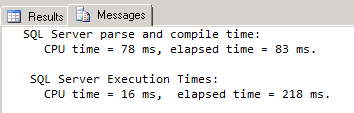
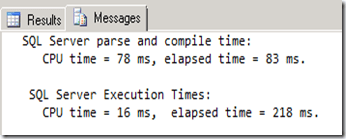
When executed against the Table with ColumnStore Index, the query executes in about 218 milliseconds. A 5x performance improvement.
image

Finding disk free space and other file level information for SQL Files

Recently a friend of mine, Rahul Soni in his blog wrote a .Net code to retrieve the file information and other drive information for all SQL Server files.

While discussing this, he wanted to know if this can be done using T-SQL or not, and so the blog article follows.

Most of the file level information can be retrieved from the catalog View Sys.Master_files. To run queries against this view and see the records, the user would need the following permissions

  • CREATE DATABASE
  • ALTER ANY DATABASE
  • VIEW ANY DEFINITION

The catalog view returns information about all the files for all the databases present in SQL Server. Details about the view can be found in SQL Server Books Online.

Additionally, to find the free space information on the Drives, I used to xp_fixeddrives extended stored procedure.

Included below is the code for the stored procedure which I wrote to get this information

   1: USE [master]

   2: GO

   3: /****** Object:  Stored Procedure [dbo].[usp_getFileinformation]    Script Date: 03/13/2012 20:13:15 ******/

   4: SET ANSI_NULLS ON

   5: GO

   6: SET QUOTED_IDENTIFIER ON

   7: GO

   8: ALTER procedure [dbo].[usp_getFileinformation]

   9: As

  10: create table #fixeddrives

  11: (

  12: Drive varchar(2), 

  13: FreeSpaceMB int

  14: )

  15:  

  16: insert into #fixeddrives(Drive,FreeSpaceMB) exec xp_fixeddrives

  17: select  

  18: DB_NAME(database_id) As DatabaseName, type_desc as FileType, 

  19: name as [FileName], physical_name as FileLocation, 

  20: (size*8)  as CurrentSizeInKB, 

  21: case    max_size

  22:      when -1 then null

  23:      else max_size

  24: end As MaxFileSize,

  25: Case  

  26:     when is_percent_growth = 1 then CAST(growth AS varchar(5)) + '%'

  27:     else CAST(growth AS varchar(5)) + ' MB'

  28: End FileGrowth,

  29: SUBSTRING(physical_name, 1,1) As Drive

  30: into #temp from master.sys.master_files

  31:  

  32: select t.DatabaseName, t.FileType, t.FileName, t.FileLocation, t.CurrentSizeInKB, t.MaxFileSize,t.FileGrowth, 

  33: fd.FreeSpaceMB As FreeSpaceOnDrive_MB

  34: from  #temp t

  35: inner join #fixeddrives fd on fd.Drive = t.Drive

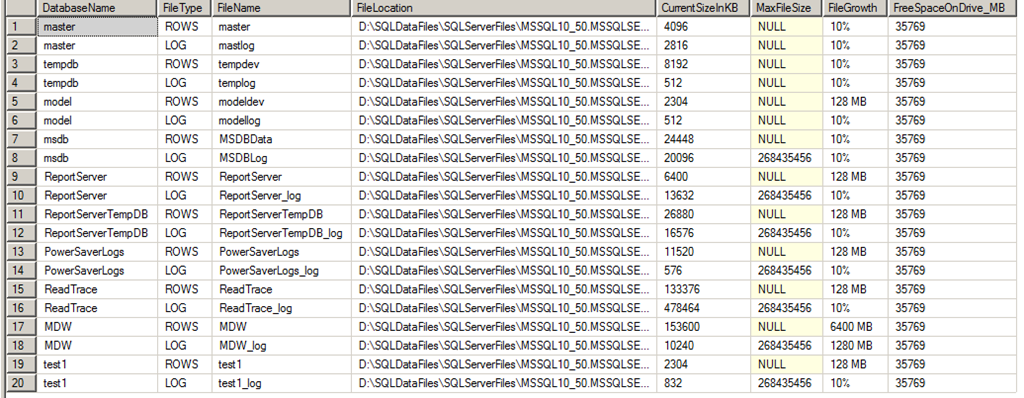
This stored procedure returns the following information.

image

Did you Know- You can perform multiple Insert, update or delete operations as a Singleton operation using the SQL 2008 MERGE operator

The Merge statement in SQL Server 2008 can be used to perform multiple inserts, update and delete operations. Assume for example, in your organization you have a Source Table and a destination table. Everyday at the end of the business, data from the Source table is appended to the Target table. With SQL 2000/SQL 2005, the only way of doing this optimally (assuming that the tables are very large) was to find the Delta of all the changes in the source table and then update the same in the target table. The problem was that you would have to write your own logic or use other SQL Features like SSIS or CDC for finding the delta and then updating the target table.

With the Merge statement you can do the same without much hassles. We can also use the Merge statement in an SSIS package or a job to automate the entire sequence.

Using the MERGE Statement

Syntax for the MERGE statement is simple to understand. First we have the Target table specified by the INTO clause, followed by the Source Table specified with the USING clause. Then we have the Join parameters. The join parameters are important, because this is what will govern which records are to be inserted or deleted or updated in the target table. Then we have the WHEN clause to define the criteria for INSERT, UPDATE and DELETE.

MERGE
[ TOP ( expression ) [ PERCENT ] ]
[ INTO ] target_table [ WITH ( <merge_hint> ) ] [ [ AS ] table_alias]
USING <table_source>
ON <merge_search_condition>
[ WHEN MATCHED [ AND <clause_search_condition> ]
THEN <merge_matched> ]
[ WHEN NOT MATCHED [ BY TARGET ] [ AND <clause_search_condition> ]
THEN <merge_not_matched> ]
[ WHEN NOT MATCHED BY SOURCE [ AND <clause_search_condition> ]
THEN <merge_matched> ]
[ <output_clause> ]
[ OPTION ( <query_hint> [ ,…n ] ) ]
;

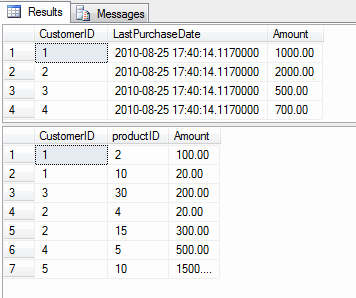
For example, assume that your organization maintains 2 tables, one for daily purchases and another for Reporting which has the last purchase date and the total amount of purchases made by each customer.

Use tempdb
Go

Create table PurchaseReporting
(
CustomerID int,
LastPurchaseDate Datetime2,
Amount Smallmoney,
)
Go

Create Table DailyPurchases
(
CustomerID int,
productID int,
Amount Money
)
Go

Insert into PurchaseReporting values (1, GETDATE(), $1000),
(2,getdate(), $2000),
(3,getdate(), $500),
(4, GETDATE(), $700)

— In the Reporting table we have 4 records for 4 different customer to indicate
— the last purchase date and the total amount of purchased goods.

Insert into DailyPurchases values(1, 2, $100),
(1,10,$20),
(3,30,$200),
(2,4,$20),
(2,15,$300),
(4,5,$500),
(5,10,$1500)

— In the Daily purchases table we have the 7 records to indicate the products purchased
— by different customers.

select * from PurchaseReporting
go
Select * from DailyPurchases
go

image

— Now lets write our Merge statement to update all the changes to the Reporting Table

MERGE PurchaseReporting as SR
Using
(Select CustomerID, getdate(), Sum(Amount) from
    DailyPurchases
    GROUP BY CustomerID) as DS(CustomerID, PurchaseDate, TotalAmount)
On SR.CustomerId = DS.CustomerID
WHEN MATCHED THEN
UPDATE SET SR.LastPurchaseDate = DS.PurchaseDate, SR.Amount = (SR.Amount + DS.TotalAmount)
WHEN NOT MATCHED THEN
INSERT values (DS.CustomerID, DS.PurchaseDate, DS.TotalAmount);

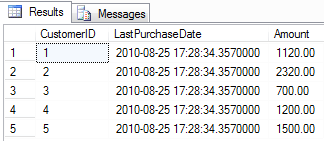
–After execution lets check the values of the Reporting Table Again

select * from PurchaseReporting

image

Notice the changes in the LastPurchaseDate and the Amount columns for the customer (1,2,3,4) and a new record with CustomerID 5 being inserted into the table.

Did you know: Trace Flag 1118 does not just affect your TempDB

A couple of days back, somebody asked if trace flag 1118 affect only the TempDB. My initial reaction was yes its only for TempDB. But then after further research, I figured out that it is not only for TempDB, but affects all user databases. The reason why we do not observe this change or why we don’t talk much about this is the fact that we do not create and drop tables on the user database at the same frequency as we do it for TempDB.

Since the schema of a user database does not change much often ( if it does in your environment, then you need to re-evaluate your design) the changes introduced by the TF does not pose any problems with DB growth or concurrency on the GAM and SGAM pages.

Changes Introduced by the TF 1118

Before we get into the details of the changes introduced, lets first talk about the default behavior in SQL. As an example we will try to create tables in both TempDB and a user DB (AdventureWorks).

When you create a table in SQL Server using the CREATE TABLE command, SQL will just create the meta data for the table, there is no allocation as of now. As seen below

use tempdb
go

create table TempTable (a int, b char(8000))
go

sp_spaceused ‘TempTable’
go

image

As the output for sp_spaceused indicates, there is no allocation done for the table as off now. The page allocation happens when we insert the FIRST record in the table. SQL Server will allocate 1 IAM page and 1 Database page (assuming the table has no indexes and also that we just need 1 page for the current set of records). SQL Server will allocate this one IAM page and 1 Data page from a mixed extent.

Insert into TempTable values (10, ‘AAA’)
go

sp_spaceused ‘TempTable’
go

image

As we can see SQL Server has allocation one Data Page and 1 Index Page (IAM) page. Under the default behavior SQL will try to Allocate the first 8 Data pages or index pages using Mixed Allocation. For any further pages, SQL will allocate a uniform extent.

In the example above we have made sure that 1 record occupies 1 DB page. If we add 8 records, as per the behavior SQL will only allocate 8 pages (all coming from Mixed Extents) and when we insert the 9th record, we would see a uniform extent being allocated.

Insert into TempTable values (10, ‘AAA’)
go 7;

Notice the go syntax used above, this is a special case where the Insert command is executed 7 times. Now lets check the output for sp_spaceused.

image

Notice that we have 8 DB pages and 1 IAM page. Now lets try to insert another record in the table.

image

Notice the increase in the unused space and the reserved space in the Table. We have 64KB allocated at the same time. Indicating the usage of a Uniform Extent this time.

That was the default behavior, what does TF 1118 change?

When TF 1118 is enabled, SQL will not perform any allocations from a Mixed Extent. So when you create a table, SQL will directly allocate a new uniform extent for the table. As shown below..

DBCC TRACEON (1118,-1)
GO

create table TempTable2 (a int, b char(8000))
go

Insert into TempTable2 values (10, ‘AAA’)
go
sp_spaceused ‘TempTable2’
go

image

The same will happen if we create a Table in any of the user Database.

use AdventureWorks
go
create table TempTable2 (a int, b char(8000))
go
Insert into TempTable2 values (10, ‘AAA’)
go
sp_spaceused ‘TempTable2’
go

image

The above output indicates that all allocation are not Uniform Extent Allocations.

Note: Once again since the rate of creation of Tables in a USER DB is almost zero, this TF will not see any impact of the TF on user DB’s.

P.S. Thank you Parikshit for helping out with the scripts.