SQLUNINTERRUPTED

I am just a medium, SQL Server the Goal

Category Archives: SQL Server

Did you know: Trace Flag 1118 does not just affect your TempDB

A couple of days back, somebody asked if trace flag 1118 affect only the TempDB. My initial reaction was yes its only for TempDB. But then after further research, I figured out that it is not only for TempDB, but affects all user databases. The reason why we do not observe this change or why we don’t talk much about this is the fact that we do not create and drop tables on the user database at the same frequency as we do it for TempDB.

Since the schema of a user database does not change much often ( if it does in your environment, then you need to re-evaluate your design) the changes introduced by the TF does not pose any problems with DB growth or concurrency on the GAM and SGAM pages.

Changes Introduced by the TF 1118

Before we get into the details of the changes introduced, lets first talk about the default behavior in SQL. As an example we will try to create tables in both TempDB and a user DB (AdventureWorks).

When you create a table in SQL Server using the CREATE TABLE command, SQL will just create the meta data for the table, there is no allocation as of now. As seen below

use tempdb
go

create table TempTable (a int, b char(8000))
go

sp_spaceused ‘TempTable’
go

image

As the output for sp_spaceused indicates, there is no allocation done for the table as off now. The page allocation happens when we insert the FIRST record in the table. SQL Server will allocate 1 IAM page and 1 Database page (assuming the table has no indexes and also that we just need 1 page for the current set of records). SQL Server will allocate this one IAM page and 1 Data page from a mixed extent.

Insert into TempTable values (10, ‘AAA’)
go

sp_spaceused ‘TempTable’
go

image

As we can see SQL Server has allocation one Data Page and 1 Index Page (IAM) page. Under the default behavior SQL will try to Allocate the first 8 Data pages or index pages using Mixed Allocation. For any further pages, SQL will allocate a uniform extent.

In the example above we have made sure that 1 record occupies 1 DB page. If we add 8 records, as per the behavior SQL will only allocate 8 pages (all coming from Mixed Extents) and when we insert the 9th record, we would see a uniform extent being allocated.

Insert into TempTable values (10, ‘AAA’)
go 7;

Notice the go syntax used above, this is a special case where the Insert command is executed 7 times. Now lets check the output for sp_spaceused.

image

Notice that we have 8 DB pages and 1 IAM page. Now lets try to insert another record in the table.

image

Notice the increase in the unused space and the reserved space in the Table. We have 64KB allocated at the same time. Indicating the usage of a Uniform Extent this time.

That was the default behavior, what does TF 1118 change?

When TF 1118 is enabled, SQL will not perform any allocations from a Mixed Extent. So when you create a table, SQL will directly allocate a new uniform extent for the table. As shown below..

DBCC TRACEON (1118,-1)
GO

create table TempTable2 (a int, b char(8000))
go

Insert into TempTable2 values (10, ‘AAA’)
go
sp_spaceused ‘TempTable2’
go

image

The same will happen if we create a Table in any of the user Database.

use AdventureWorks
go
create table TempTable2 (a int, b char(8000))
go
Insert into TempTable2 values (10, ‘AAA’)
go
sp_spaceused ‘TempTable2’
go

image

The above output indicates that all allocation are not Uniform Extent Allocations.

Note: Once again since the rate of creation of Tables in a USER DB is almost zero, this TF will not see any impact of the TF on user DB’s.

P.S. Thank you Parikshit for helping out with the scripts.

Using XQuery expressions with XML in SQL Server 2005 and later

Continuing with the discussions on XML, today in this post we will talk about how to use XQuery with XML in SQL Server 2005 and later. For a list of other related topics refer here.

With XML data type support in SQL Server 2005, documents can now be stored in the form of XML and then Queries using XQuery. XQuery Language can query both structured or semi-structured XML data. XQuery is based on XPath queries, but provides better Iteration, better sorting ability.

A list of XQuery functions which can be used with the XML data types in SQL can be found at the following MSDN site.

Similarly some of the XQuery() operators supported with XML data types are

  1. Numeric operators (+, -, *, div, mod)
  2. Operators for value comparison (eq, ne, lt, gt, le, ge)
  3. Operators for general comparison ( =, !=, <, >, <=, >= )

To better understand the usage, lets try to use some of these functions and operators in a query. To use XQuery with SQL XML data type, we would need to call the XML Query() method. We will be discussing some other XML data types methods in subsequent posts.

Query method takes an XML XQuery expression and returns an Untyped XML as an output. An XQuery expression has two main parts

1) A XQuery Prolog, which declares the namespaces to be used for typed XML. In SQL the prolog can only contain namespace declarations.
2) The XQuery body, which declares a sequence of XQuery expression, for the intended results.

SELECT Instructions.query(‘
declare namespace
AWMI="http://schemas.microsoft.com/sqlserver/2004/07/adventure-works/ProductModelManuInstructions";
    /AWMI:root/AWMI:Location[@LocationID=10]’) AS Result
FROM  Production.ProductModel
WHERE ProductModelID=7

In the above query, the DECLARE NAMESPACE part is used to declare a prefix AWMI for the XML schema ProductModelManuInstructions. This prefix will be used when referencing any element in the XML document created against this schema.

The “/AWMI:root/AWMI:Location[@LocationID=10]” expression is the XQuery body and is used to iterate to the desired element or node or attribute in the XML instance.

Now lets take a slightly complex example, which would include some of the XQuery functions and operators mentioned earlier.

SELECT
Resume.query(‘
        declare namespace rns ="http://schemas.microsoft.com/sqlserver/2004/07/adventure-works/Resume";
    for $Name in /rns:Resume/rns:Name
        return
        <Name>
            {string($Name/rns:Name.Prefix)}{string(" ")}{string($Name/rns:Name.First)}{string(" ")}
            {string($Name/rns:Name.Middle)}{string(" ")}{string($Name/rns:Name.Last)}{string(" ")}
        </Name>,
    <Skill>
        {substring( ((rns:Resume/rns:Skills)[1]),1,56)}
    </Skill>,
    for $Employment in /rns:Resume/rns:Employment
        return
        <JobDetails>
                StartDate = {string($Employment/rns:Emp.StartDate)[1]}
                EndDate = {string($Employment/rns:Emp.EndDate)[1]}
                JobProfile = {concat(string(($Employment/rns:Emp.OrgName)[1]),string("—"),
                string(($Employment/rns:Emp.JobTitle)[1]))}
        </JobDetails>
        ‘
) as Results
from
HumanResources.JobCandidate where EmployeeID = 268

Lets take a minute and understand the query first. As mentioned there are two parts to the XQuery, the Prolog and the Body.  The Prolog contains the namespace declaration, which in this case is
    declare namespace rns ="http://schemas.microsoft.com/sqlserver/2004/07/adventure-works/Resume";

The Body is a comma separated list of XQuery expressions to return the desired results. In this case the body contains 3 XQuery Expressions, described below

The First Expression, creates a NAME string from the Prefix, First, Middle and Last elements in the XML. Note the usage of string functions and the FOR loop. We will discussing this special Looping mechanism in subsequent posts.
    for $Name in /rns:Resume/rns:Name
    return
    <Name>
        {string($Name/rns:Name.Prefix)}{string(" ")}{string($Name/rns:Name.First)}{string(" ")}
        {string($Name/rns:Name.Middle)}{string(" ")}{string($Name/rns:Name.Last)}{string(" ")}
    </Name>,
The Second expressions returns the skill set for the Candidate. Note the usage of substring function in the expression.
    <Skill>
        {substring( ((rns:Resume/rns:Skills)[1]),1,56)}
    </Skill>,
The third expressions, lists all the previous jobs undertaken by the Candidate. Note the usage of the For looping mechanism and the CONCAT function being used.
    for $Employment in /rns:Resume/rns:Employment
    return
    <JobDetails>
            StartDate = {string($Employment/rns:Emp.StartDate)[1]}
            EndDate = {string($Employment/rns:Emp.EndDate)[1]}
            JobProfile = {concat(string(($Employment/rns:Emp.OrgName)[1]),string("—"),
            string(($Employment/rns:Emp.JobTitle)[1]))}
    </JobDetails>

In SQL, the schema declaration can be separated from the XQuery using the WITH NAMESPACE statement. For example the above query can also be written as

WITH XMLNAMESPACES (‘http://schemas.microsoft.com/sqlserver/2004/07/adventure-works/Resume’ as rns)
SELECT Resume.query(‘
for $Name in /rns:Resume/rns:Name
return
……

XML Schema collections in SQL Server

Continuing with the discussion on XML, today we will talk about XML Schema collections. For a complete list of related topics, please refer here. If you are looking for a detailed course on XML Schema Definitions, please start here.

Schema collections were introduced in SQL Server 2005, and allow the user to create a collections of XML schema definitions, which can later be used define a typed XML variable, parameter or XML column. Just like a normal table, an XML Schema collection can be created, dropped or modified. SQL Server 2005/2008 provides some guidelines and limitations for creating XML schema collections and XML schema definitions. The details can be found at the following MSDN site

SQL 2005: http://msdn.microsoft.com/en-us/library/ms190665(v=SQL.90).aspx

SQL 2008: http://msdn.microsoft.com/en-us/library/ms190665(v=SQL.100).aspx

In this article we would be taking about the DDL support for creating XML Schema collections. We will also talk about what needs to be done, if one of the schema definition (xsd), needs to be changed.

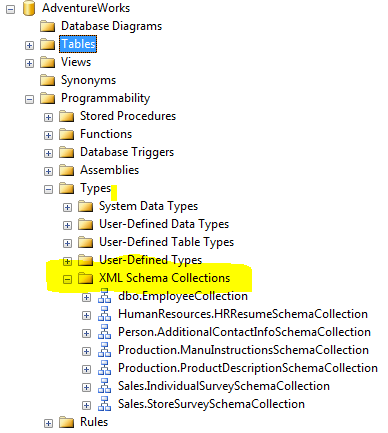
Before we get on with the DDL for creating a schema collection, lets quickly figure out where in the Database are these collections created. Since AdventureWorks database already has some SchemaCollections defined, lets have a look at these.

In the AdventureWorks database browse to Programmability->Types->XML Schema Collection, we would find of the Schema collections being used with the database.

image

Each, SchemaCollection mentioned in the list contains at least one XML Schema definition, which would be used by some XML column in one of the tables in the Database. Additionally these can be used with XML variables and parameters.

DDL FOR SCHEMA COLLECTIONS

SQL Server supports Creation/deletion/modification of the SCHEMA COLLECTION objects using the following T-SQL syntax.

CREATE XML SCHEMA COLLECTION [ <relational_schema>. ]sql_identifier AS Expression
DROP XML SCHEMA COLLECTION [ relational_schema. ]sql_identifier
ALTER XML SCHEMA COLLECTION [ relational_schema. ]sql_identifier ADD ‘Schema Component’

Once we have created an XML Schema Collection, we can then query the details using the following DMV’s

To list all the schema collection in the Database: sys.xml_schema_collections
To list the XML namespaces in the  database: sys.xml_schema_namespaces

Now lets try to create an XML schema collection in the Database


CREATE XML SCHEMA COLLECTION ITEMS
AS
‘<xsd:schema xmlns:xsd="http://www.w3.org/2001/XMLSchema"
    targetNamespace="http://TestNameSpace.com"
    xmlns:ns="http://TestNameSpace.com"
    elementFormDefault="qualified">
<xsd:element name ="Book" >
      <xsd:complexType>
        <xsd:sequence>
              <xsd:element name="Publication" type="xsd:string"/>
              <xsd:element name="AuthorFirstName" type="xsd:string" minOccurs="0" maxOccurs="1"/>
              <xsd:element name="AuthorLastName" type="xsd:string" minOccurs="0" maxOccurs="1"/>
              <xsd:element name="PublishedDate" type="xsd:string" minOccurs="0" maxOccurs="1"/>
        </xsd:sequence>
      <xsd:attribute name="BookID" type="xsd:int"/>
  </xsd:complexType>
</xsd:element>
</xsd:schema>’

Once the SchemaCollection is added to the database, we can declare typed XML columns or XML variables using this schema. For example

Declare @Var1 XML(Books)
create table BookDetails (PublicationDate Datetime, Book XML(ITEMS))

To modify the XML schema collection, we would need to take care of all the dependencies. In our example, the Book Column in Table BookDetails is currently typed against the Books Schema collection. Attempts to modify the schema (add element or attribute) will not fail, but removing an element from the schema or modifying the data type of the elements might generate an error.

— Modiying the existing schema in the Collection
ALTER XML SCHEMA COLLECTION ITEMS
ADD ‘<xsd:schema xmlns:xsd="http://www.w3.org/2001/XMLSchema"
    targetNamespace="http://TestNameSpace.com"
    xmlns:ns="http://TestNameSpace.com"
    elementFormDefault="qualified">
              <xsd:element name="BookType" type="xsd:string"/>
</xsd:schema>’
— Adding a new schema to the Collection
ALTER XML SCHEMA COLLECTION ITEMS
ADD ‘<xsd:schema xmlns:xsd="http://www.w3.org/2001/XMLSchema"
    targetNamespace="http://CarNameSpace.com"
    xmlns:ns="http://CarNameSpace.com"
    elementFormDefault="qualified">
<xsd:element name ="Car" >
      <xsd:complexType>
        <xsd:sequence>
              <xsd:element name="Company" type="xsd:string"/>
              <xsd:element name="Model" type="xsd:string" minOccurs="0" maxOccurs="1"/>
              <xsd:element name="Color" type="xsd:string" minOccurs="0" maxOccurs="1"/>
              <xsd:element name="Type" type="xsd:string" minOccurs="0" maxOccurs="1"/>
        </xsd:sequence>
      <xsd:attribute name="EngineID" type="xsd:int"/>
  </xsd:complexType>
</xsd:element>
</xsd:schema>’

When inserting or updating the XML contents in the table, the final XML would be validated against the schema declaration in the collection. If any mismatch is found, an error will be generated. In SQL 2005, there is strict type validation is performed. There are no LAX validations allowed in SQL 2005, while in SQL 2008 LAX validations of Any, AnyType and AnyAttribute is allowed. We will talk more about these in subsequent posts.

An attempt to insert an XML which does not comply to the defined schema, generated an error. For example the below mentioned insert will generate an error as indicated…

insert into BookDetails values (getdate(),
‘<Book xmlns="http://TestNameSpace.com" BookID="TEST"> </Book>’)
—- Error Message
Msg 6926, Level 16, State 1, Line 1
XML Validation: Invalid simple type value: ‘TEST’. Location: /*:Book[1]/@*:BookID

XML SchemaCollections cannot be dropped while it is in use by any of the following

  1. Associated with any xml type parameter or column.
  2. Specified in any table constraints.
  3. Referenced in a schema-bound function or stored procedure.

Attempts to drop an SCHEMA COLLECTION while in use will generate an error.

DROP XML SCHEMA COLLECTION ITEMS
—– Error
Msg 6328, Level 16, State 1, Line 1
Specified collection ‘Items’ cannot be dropped because it is used by object ‘dbo.BookDetails’.

To Drop an existing XML SCHEMA COLLECTION, we need to perform the following steps.

  1. Either convert all the columns to Well-Formed Untyped XML, or drop the Columns/Tables
  2. Drop the Schema Collection
  3. Recreate the SCHEMA Collections for other schemas.

In the earlier example, to remove the BOOKS schema definitions, we would have to perform the steps as follows

1. Alter table "BookDetails" to make the "Book" column as Well-Formed
    ALTER TABLE BookDetail ALTER Column Book XML
2. Drop the XML Schema collection
    DROP XML SCHEMA COLLECTION ITEMS
3. Recrete the XML Schema Collections
    Create XML Schema Collection…..

In the next post I will talking about XML Indexes in SQL Server 2005 and SQL Server 2008. Till then happy learning.

NESTED FOR XML Queries with SQL Server

Continuing with the series on XML, today we will talk about NESTED XML queries in SQL Server. The ability to write NESTED queries with FOR XML was introduced in SQL 2005 and was largely possible because of the introduction of XML data type in SQL. The results from a nested query could be passed on as an XML to the outer query, where it can be further processed using one of the XQuery methods.

For a complete list of all related articles please refer here.

A Simple example of a nested FOR XML query can be

DECLARE @x xml, @i datetime
SET @x=(SELECT EmployeeID, Title, HireDate
        FROM HumanResources.Employee
        WHERE EmployeeID < 5
        FOR XML RAW, TYPE)
SELECT @x
select @i=@x.value(‘/row[1]/@HireDate[1]’, ‘datetime’)
select @i

<<<< Output >>>>
<row EmployeeID="1" Title="Production Technician – WC60" HireDate="1996-07-31T00:00:00" />
<row EmployeeID="2" Title="Marketing Assistant" HireDate="1997-02-26T00:00:00" />

1996-07-31 00:00:00.000

<<<< Output >>>>

The TYPE directive is of importance here. Without the type directive the results would be returned in a nvarchar(max) format. In the above query if we do not Specify the TYPE directive, but declare @x as XML, SQL will try to do the automatic conversion and allow you to process the result as an XML type. But if we declare the variable as nvarchar(max) and then try to use the XQuery it would fail.

Now lets take a more complex example of the Nested FOR XML queries.

SELECT EmployeeID, HireDate,
       (select Contact.FirstName, Contact.LastName
            from Person.Contact Contact
            where Contact.ContactID = Employee.ContactID
        FOR XML AUTO, TYPE
       ) as Name
FROM HumanResources.Employee Employee
ORDER BY EmployeeID

—- Output —————–

EmployeeID HireDate Name
1

1996-07-31 00:00:00

<Contact FirstName="Guy" LastName="Gilbert" />
2

1997-02-26 00:00:00

<Contact FirstName="Kevin" LastName="Brown" />
3

1997-12-12 00:00:00

<Contact FirstName="Roberto" LastName="Tamburello" />
4 1998-01-05 00:00:00 <Contact FirstName="Rob" LastName="Walters" />

In the above query, we are returning the employee names as an XML. If we specify a FOR XML in the outer query also, we will get an XML style output.

As a final Example, lets write a query which will use the inner query and perform some XML type operations on it.

SELECT EmployeeID,
( SELECT Contact.FirstName, Contact.LastName
   FROM Person.Contact Contact
   –where Contact.ContactID = Employee.ContactID
   FOR XML AUTO, type ).query
                (‘for $p in /Contact
                    return
                 <Name>{string($p/@FirstName)} {string(" ")}
                        {string($p/@LastName)} {string(" ")}></Name>’)
FROM HumanResources.Employee Employee
ORDER BY EmployeeID
FOR XML AUTO, TYPE

Here we are using the inner query as an XML and doing XPath() query on this. We are using a special construct of XPath() queries called the FWOR statement to query the XML returned by the inner query. Below is the output.

EmployeeID Name
1 <Name>Guy Gilbert </Name>
2 <Name>Kevin Brown </Name>
3 <Name>Roberto Tamburello </Name>
4 <Name>Rob Walters </Name>
5 <Name>Thierry D’Hers </Name>
6 <Name>David Bradley </Name>


Hope this helps.

Working with FOR XML PATH mode in SQL 2005

PATH mode was added in SQL 2005, to allow for easier query writing experience. Using the FOR XML EXPLICIT mode, we could have got the desired results, but writing query was really cumbersome. Especially if there is multiple level of nesting.

For a complete list of related articles refer here.

FOR PATH provides a very simple way for mixing elements and attributes. It also provides a simpler way of nesting elements in the XML. In PATH mode, column names are used to represent whether the values will form an Element, an attribute. If a column name or Column alias is not specified all values will be represented inline. For example,

SELECT ‘I dont have a Column Name’ FOR XML PATH
<<<<<<Output>>>>>>             <row>I dont have a Column Name</row>         <<<<<<Output>>>>>> 

SELECT ‘I dont have a Column Name’, ‘ Another Column’ FOR XML PATH
<<<<<<Output>>>>>>            <row>I dont have a Column Name Another Column</row>     <<<<<<Output>>>>>> 

Since we are not providing column names (which in turn determines the nesting, SQL tries to add everything as one attribute.

Specifying Column Names

Column names in FOR PATH mode, have special meaning. Care should be while specifying the column names. As mentioned below, different symbols or formats have different meaning in the PATH mode.

Column names starting with @ : Path mode will treat it as an attribute value. If there a path expression prior to the @ColName, then this column name will become an attribute of the Element specified by the path expression. Else it will become an attribute of the root element. For Example…

/Employee/@EmpId : This will make EmpId an attribute of Employee Element.
@EmpID: This will create EmpID as an Attribute of the root element.

Column names Not starting with @ : Path mode will treat it as an Element. If there a path expression prior to the ColName, then this column name will become an SubElement of the Element specified by the path expression. Else it will become a SubElement of the root element. For Example…

/Employee/Name: This will make Name as SubElement of Employee Element.
Name: This will create Name as a SubElement of the root element.

Columns with Same path prefix: Columns having the same path prefix are grouped together and created as SubElement of the Element specified. If for some reason a different column with a different prefix is specified in between a sequence, a new element will be created when the path prefix is repeated. For example,

SELECT 
       FirstName "EmpName/First",
       AddressLine1 "Address/AddrLine1",
       AddressLine2 "Address/AddrLIne2",
       City "Address/City",
       MiddleName "EmpName/Middle",
       LastName "EmpName/Last"
FROM   HumanResources.EmployeeAddress E, Person.Contact C, Person.Address A
WHERE  E.EmployeeID = C.ContactID
AND    E.AddressID = A.AddressID
AND    E.EmployeeID=1
FOR XML PATH

In the above query we have specified FirstName, MiddelName and LastName as having the path prefix "/EmpName/…", which causes SQL to try and club these together and create as SubElements of the EmpName element. But in the query above, we have specified "/Address/.." immediately after the FirstName column, which restricts SQL from grouping the "/EmpName" elements together. The output in this case will be

<row>
  <EmpName>
    <First>Gustavo</First>
  </EmpName>
  <Address>
    <AddrLine1>7726 Driftwood Drive</AddrLine1>
    <City>Monroe</City>
  </Address>
  <EmpName>
    <Last>Achong</Last>
  </EmpName>
</row>

Column Names as Wildcard characters: If wildcards are used in place of column names, SQL will treat it like Columns with no names.

Column Names with Path Specified as Data: If we have a nested query returning multiple value, or if we want to specify or create a list/union like element, we can use the data() path expressions. This will tell SQL Server that the element generated are to be treated as atomic values. If there are multiple values, then a space separated list of values is created. For Example,

create table test_xml_path(a int)
go
insert into test_xml_path values (10)
go 7 

SELECT 1       as "@First",
       2                 as "@Second",
       (select a as "data()" from test_xml_path FOR XML PATH (”)) as "@Third"
FOR XML PATH

— Output ———-
<row First="1" Second="2" Third="10 10 10 10 10 10 10" />

Now that we have listed all the conventions, lets try to run a query which will use some of the naming conventions and the directives.

SELECT
       EmployeeID "@EmpID",               
       FirstName "EmpName/First",
       MiddleName "EmpName/Middle",
       LastName "EmpName/Last",
       AddressLine1 "Address/AddrLine1",
       AddressLine2 "Address/AddrLIne2",
       City "Address/City"
FROM   HumanResources.EmployeeAddress E, Person.Contact C, Person.Address A
WHERE  E.EmployeeID = C.ContactID
AND    E.AddressID = A.AddressID
AND    E.EmployeeID=1
FOR XML PATH (‘Employee’), ELEMENTS XSINIL
go

— "@EmpID" Forms an attribute for root node.
— "EmpName/First" First forms a child element of the EmpName element. Similarly for "EmpName/Middle" and "EmpName/Last"
— Similarly AddrLine1,AddrLine2,City forms a SubElements for Address.
— The ELEMENTS and XSINIL directives have the same usage as with AUTO mode, EXPLICIT mode or RAW mode.

<<<<<<<<<<<<<<<<<<<<<<< Output >>>>>>>>>>>>

<Employee xmlns:xsi="http://www.w3.org/2001/XMLSchema-instance&quot; EmpID="1">
  <EmpName>
    <First>Gustavo</First>
    <Middle xsi:nil="true" />
    <Last>Achong</Last>
  </EmpName>
  <Address>
    <AddrLine1>7726 Driftwood Drive</AddrLine1>
    <AddrLIne2 xsi:nil="true" />
    <City>Monroe</City>
  </Address>
</Employee>

<<<<<<<<<<<<<<<<<<<<<<< Output >>>>>>>>>>>>

In the next post, I will discussing Nested FOR XML queries.